
Release Notes 004: Import and Export Files and New LaTeX Blocks
What's New?
In this release, we have enabled the ability to import and export .md(Markdown), .txt(Text), .ipynb(Jupyter Notebooks), and .docx (Microsoft Word) formats from your device as well as what you have saved in Google Drive. Also you can now import and export formatted CSVs from notecard files to quickly create new decks or mass edit existing ones. Finally, we have added LaTeX blocks to the Scribby Editor so that LaTeX markup can be displayed within text or as a standalone block.
Importing and Exporting
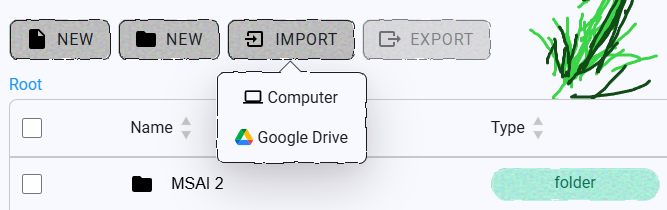 Within your dashboard there are two new buttons above the folder and file viewer. The first allows you to upload multiple files or folders in the approved formats and they will be automatically created. You can source these files from either your local device or from your Google Drive
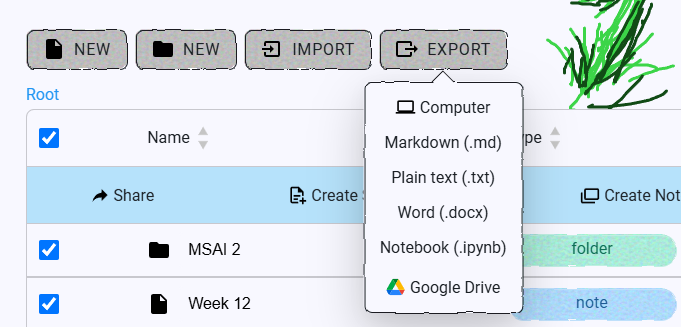 The second export button allows you to save your scribby creations locally in multiple formats. You can also upload them to your Google Drive for cloud storage.
LaTeX Blocks
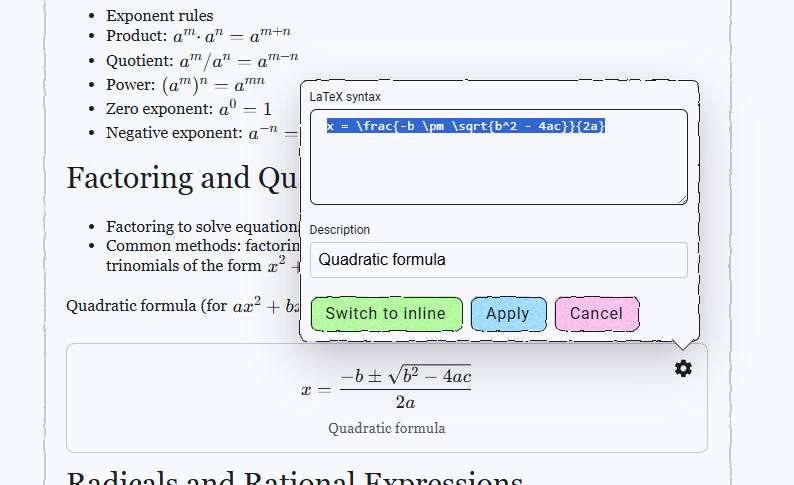 Also we are now adding LaTeX blocks! Now you can integrate beautifully formatted math equations directly within your Scribby Editor as quickly as you can write the LaTeX markup. You also have the option to switch between displaying the formulas inline or as their own blocks with descriptive labels.
What's Next?
Do you like this change but want something more out of it? Feel free to reach out on Reddit, Discord, or contact us. I would love to get feedback from users like you to make Scribby great! In the next release, I would like to create persistent memory between ran code blocks and also overhaul sharing and sharing groups.